

Ask a product team how they’re doing in the age of AI agents and most will tell you how often ChatGPT recommends them. That is the question an entire industry, generative engine optimisation, has taught them to ask. Get described well by the models, earn the citations, and let their models do the talking for your product.
It is half the job, and I think it is the smaller half.
This week I asked ChatGPT, Gemini and Claude the same question: what is the best AI-native CRM, and what is each one best at? Three things stood out.
One product appeared on all three lists. Two of the biggest names in the category were in or out depending on which model I asked; one assistant excluded them as “established CRMs with AI layers”, another put them second and third. One assistant’s pick came with citations to the vendor’s own website, where the vendor publishes an article ranking itself first in the category. And every “best at” line was a category label: best for startups, best for enterprise, best for outbound. Not one said what a customer should do with the product once they had it.
Three models, three shortlists, and none of them knew anything beyond the brochure. That is the state of the first layer.
Two decisions, not one
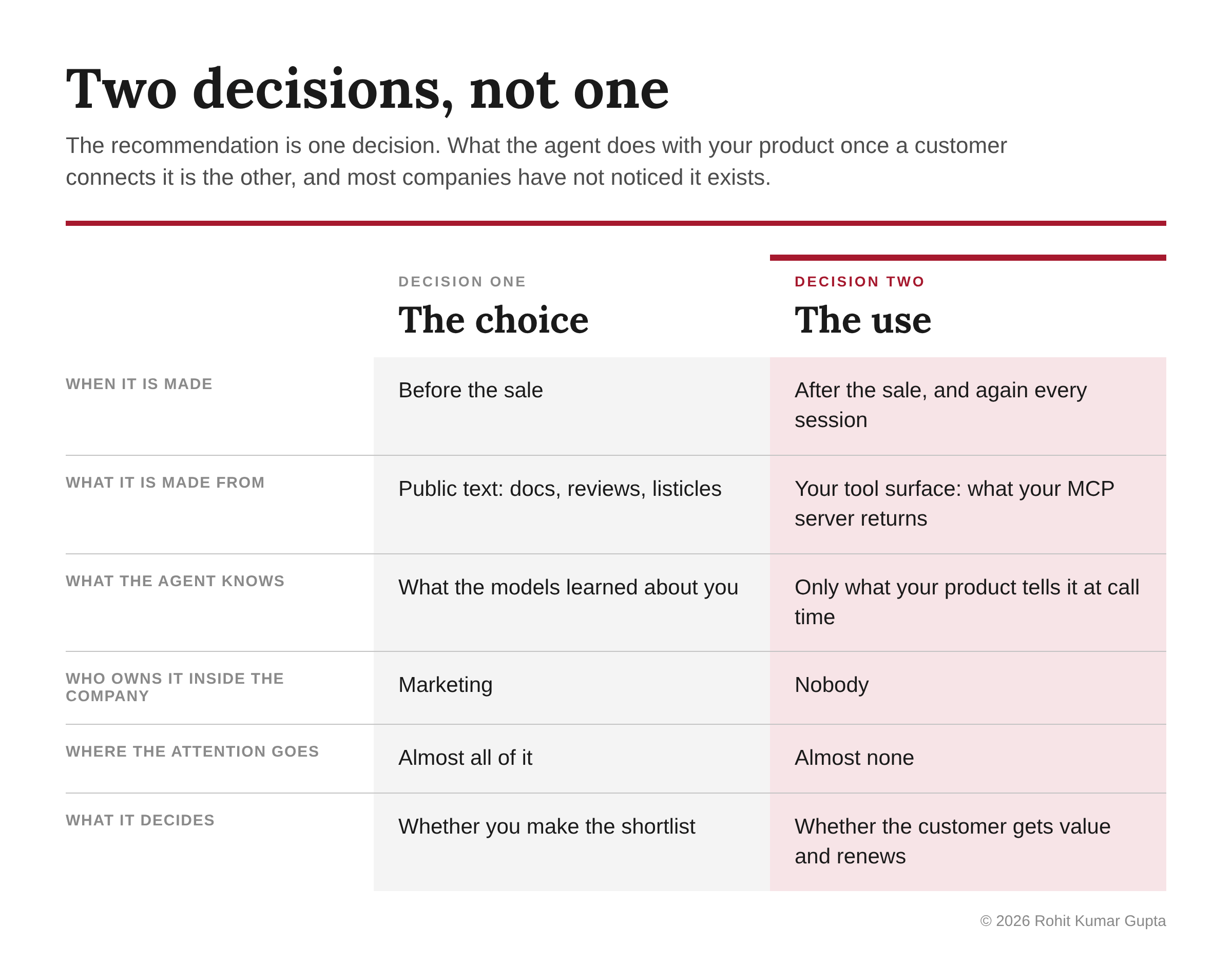
An agent now makes two decisions about your product, at two different moments, from two different inputs.
The first is the choice: which product makes the shortlist. The agent makes it from public text, before the sale, and the test above shows how uneven that is. Most of the attention on “marketing to agents” goes here.
The second is the use. Once a customer connects their assistant to your product, the agent decides what to do with it: which features to call, in what order, for what. That decision is made after the sale, from whatever your product exposes to the agent, and it is made again every session. Most companies have not noticed it exists.
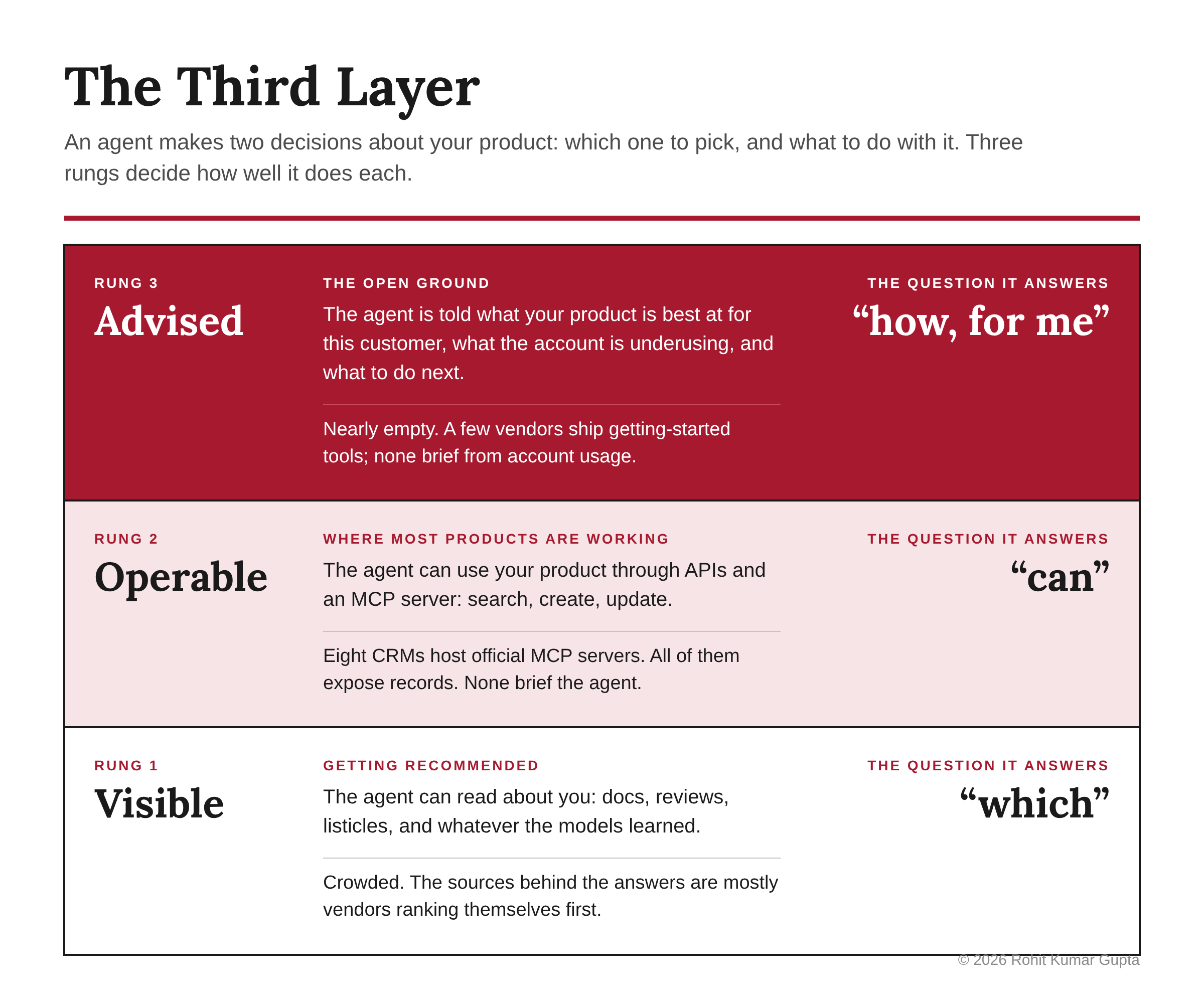
I find it useful to think of this as a ladder with three rungs. Visible: the agent can read about you. Operable: the agent can use you. Advised: the agent is told what you are best at, for this customer, and what to do next. Almost everyone is working on the first two rungs. The third is nearly empty.
What the agent sees on rung two
The standard way to let an agent use a product is a Model Context Protocol server, and the CRM vendors have all built one. HubSpot, Salesforce, Microsoft Dynamics 365, Pipedrive, Attio, Zoho CRM, Close and HighLevel all host official MCP servers now; HubSpot’s and Salesforce’s went generally available in April. Attio’s docs say its server lets an assistant search records, create and update them, work with notes and tasks, and read emails and meeting data. That is representative.
A review of all eight servers against their vendors’ documentation found the same shape: operations on records, and in a couple of cases on configuration and workflows. It found no guidance, onboarding or workflow advice described for any of them. The closest thing is a help page of sample prompts, written for humans. So the customer’s agent arrives with full access and a tool list, and nothing that says what this product is best at, what this account is underusing, or what to do first.
Layer one answers “which”. Layer two answers “can”. Nobody answers “how, for me”.
A few vendors outside CRM have noticed the blank page. HG Insights ships a tool called phoenix_onboarding that takes a user’s role and company and returns the one to three workflows to run first. Big Red Cloud, an accounting product, has a getting-started tool that answers “how do I begin”. These are the earliest signs of a third rung, and they are worth studying. They are also first-run orientation: they know who you are, not what your workspace has done since. A brochure with a greeting is still a brochure.
Why this matters most after the sale
Customers already use a fraction of what they buy. In 2019, Pendo analysed feature usage across 615 subscriptions and found that 80% of features in the average product were rarely or never used, while 12% of features drove 80% of daily use. The gap between what a product can do and what a customer actually does is where onboarding teams, customer success managers and quarterly business reviews earn their keep, at least for the accounts big enough to get them.
Now put an agent in front of that product with a tool list and nothing else. It will do what it was asked and take the obvious path. I expect the gap to widen, not close, because the agent is efficient at the task in front of it and blind to everything around it. The human used to wander into features by accident. The agent won’t.
The channel is already real. PostHog, an analytics company, logged close to 10 million agent tool calls into its product in a single month this summer. That is a lot of use happening with nobody from the vendor in the room.
That is the commercial point. The first layer is about conversion. The third layer is about value realised, renewal and net revenue retention, which is where most of a software company’s lifetime value sits and where its customer-success spend already goes.
Why only the vendor can do it
Here is the fact that makes this the vendor’s job rather than the platform’s. By default, an agent remembers nothing about your product between sessions. Each time it connects, it reads your tool list from scratch. Whatever memory exists lives with the platform, with OpenAI or Anthropic or Google, not with you.
I first read that as a problem. It is the opposite. The agent is stateless about your product, but your server is stateful about the account. It knows who is calling, because they signed in. It knows what this workspace has done, what it hasn’t touched, and what similar customers did that worked. No general model holds that, and no platform memory can produce it, because the data isn’t theirs.
So the thing only you can supply is exactly the thing the agent cannot carry: a briefing about this account, computed fresh at every call.
Brief, don’t answer
What does that briefing contain? Not a chatbot, and not a knowledge base. Mathias Biilmann, the Netlify chief executive who coined “Agent Experience” in early 2025, argues that too many companies are adding shallow AI features or building yet another AI agent when they should be making their products usable by agents. He is right. A customer’s agent does not want to chat with yours. It wants a fact it can use.
A briefing is a short, structured statement, returned as data: what this workspace is underusing, what customers like it got value from, the one next step worth taking, and what the product is not for. “Three of twelve seats active in the last thirty days. Two of six pipeline stages in use. Teams your size usually set up stage automation in week two. Not a fit for marketing automation; connect your existing tool.” An agent-to-agent QBR, on demand.
Two constraints from how MCP actually works shape the design. First, it has to be a tool, not a description. Tool descriptions sit in the model’s context on every turn, so clients now trim and defer them aggressively; a briefing written into a description is the first thing cut. The guidance has to live in the result of a tool the agent calls, paid for only when it’s used. Second, nobody asks an agent for advice. People ask it to update the deal. An advisory tool with no trigger is dead weight. So the briefing has to ride on the back of ordinary tasks, one account-specific line appended to each result, and the product has to teach its humans to ask: “ask your assistant what we should try next.”
Why would my agent trust yours?
The obvious objection is conflict of interest. A vendor briefing a customer’s agent sounds like a vendor blog with an API, and people discount vendor blogs for good reason.
Two things answer it. The first is timing. Before the sale, the vendor wants the purchase and the buyer’s agent is right to be wary. After the sale, the incentives line up: the vendor gets paid when the customer gets value, and the renewal depends on it. That is why the third layer is post-sale and not a sales tool.
The second is format. A briefing that returns checkable data, numbers the agent can verify with its own calls, earns a return visit. A briefing that returns “upgrade to Pro” is marketing, and an agent will treat it the way readers treat a vendor blog. Honesty here is not a virtue. It is the format. A vendor whose briefing surfaces idle seats as readily as upsells is the one a customer’s agent will come back to, and the one a customer will trust with the renewal.
The platforms will absorb some of this, and they should. Generic “how to use Attio” is theirs to learn. What they cannot absorb is “what this workspace is underusing”, because they don’t hold the usage. Keep the briefing account-specific or it is absorbable.
Who owns this
Inside most companies, nobody. Marketing owns how the models describe the product. Platform or developer relations owns the MCP server. Customer success owns the knowledge of what good customers do, and most of it is tacit, sitting in call recordings and Slack threads rather than in any system. The briefing sits between all three and belongs to none of them.
That is the actual work, and it is organisational before it is technical: deciding who owns the customer’s agent, and turning what the CS team knows into something a machine can return. It is also the kind of decision that cannot be delegated to the agent. It needs a person who can see all three functions and has the standing to assign it.
Monday morning
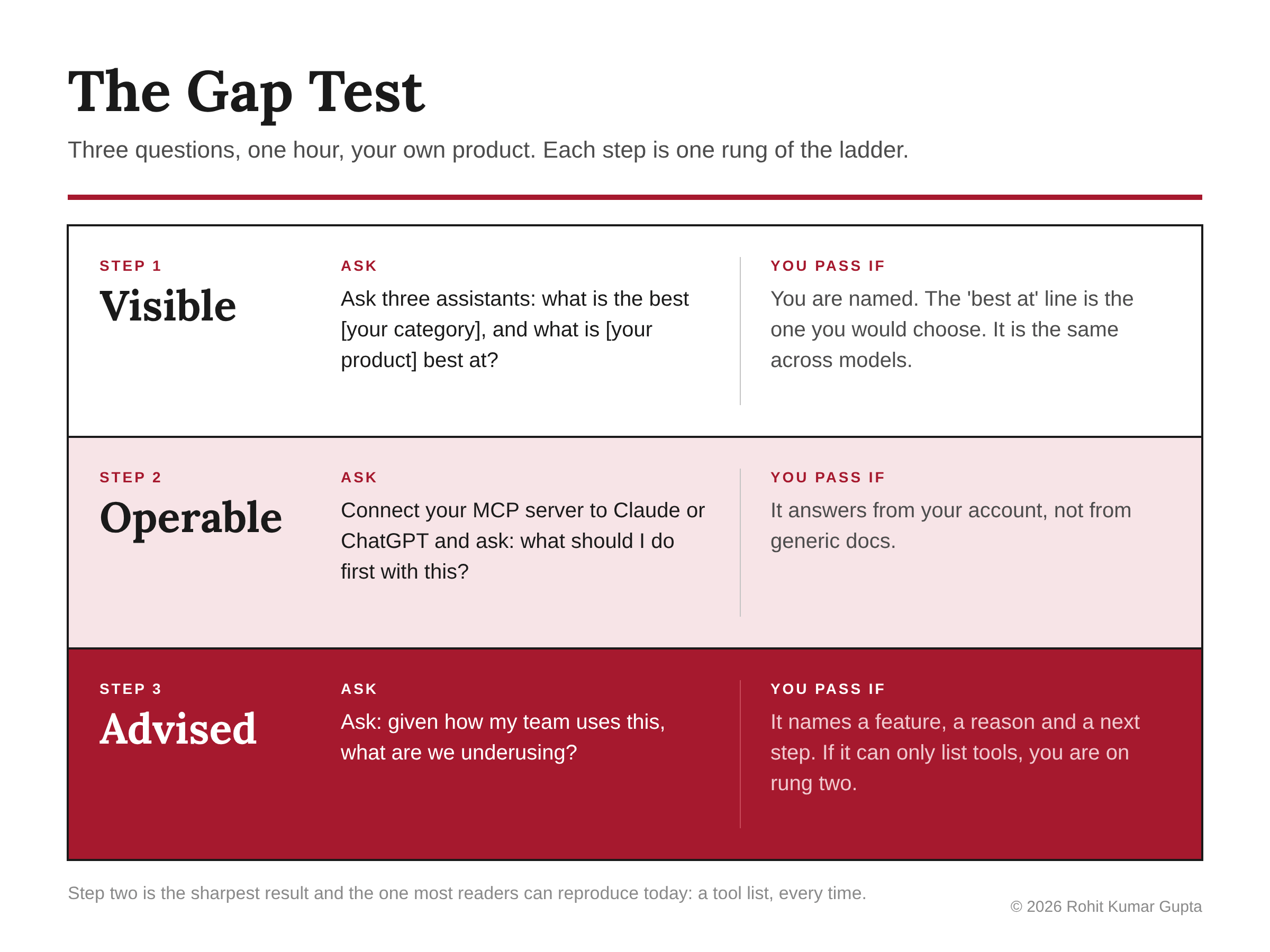
Run the Gap Test on your own product. It takes an hour.
Visible: ask three assistants “what’s the best [your category]” and “what is [your product] best at”. Are you named? Is the “best at” line the one you would choose? Is it the same across models?
Operable: connect your MCP server to Claude or ChatGPT and ask “what should I do first with this?” Does it answer from your account, or from generic docs?
Advised: ask “given how my team uses this, what are we underusing?” If the agent can only list tools, you are on rung two.
Then build the smallest third layer that works. Three read-only tools: a product-fit statement, public and unauthenticated, that says what you are best at and not for, which doubles as your most checkable source for rung one; an account-next-steps call, computed from this workspace’s usage and similar-customer patterns, returning data rather than copy; and a one-line “next” hint on every ordinary tool result. Seed the ask in onboarding. Log agent calls by client, and watch one number: how often a briefing is followed by the feature being adopted.
Where this settles
The recommendation crowd is right that agents will choose products and use them on people’s behalf. It is wrong about where the contest is. Getting described well is table stakes and a crowded one; the sources behind those three CRM answers were largely vendors ranking themselves. Getting used well is the open ground, and the only party that can brief the customer’s agent is the one holding the account.
Visible, Operable, Advised. Most products are still working on the second rung. Which rung is yours on, and who is briefing your customer’s agent right now?
Sources
The blind test: ChatGPT, Gemini Pro, and Claude, asked the same question on 13 November 2026.
eseospace, Best MCP Servers for CRM in 2026 (28 October 2026)
MCP Playground, CRM MCP servers compared
HG Insights, phoenix_onboarding tool documentation
Big Red Cloud, brc_getting_started (official MCP server)
PostHog, Are agents really killing UI? (August 2026)
Mathias Biilmann, Introducing AX: Why Agent Experience Matters (January 2025), and his interview with Dan Cleary
WorkOS, The real token cost of an MCP server; mcp.directory, MCP context bloat and tool search
Coffee.ai, Best AI-Native CRM Platforms 2026 (an example of a vendor ranking itself first)